Managing support requests in today’s fast-paced business landscape demands accuracy, context, and speed. However, many organizations still struggle with scattered data, repetitive classification work, and lack of visibility across recurring issues.
This results in delayed resolution, increased workload on support teams, and frustrated end-users. This is where PinTags Category Creation becomes a powerful solution—bringing structure, clarity, and speed to your support operations.
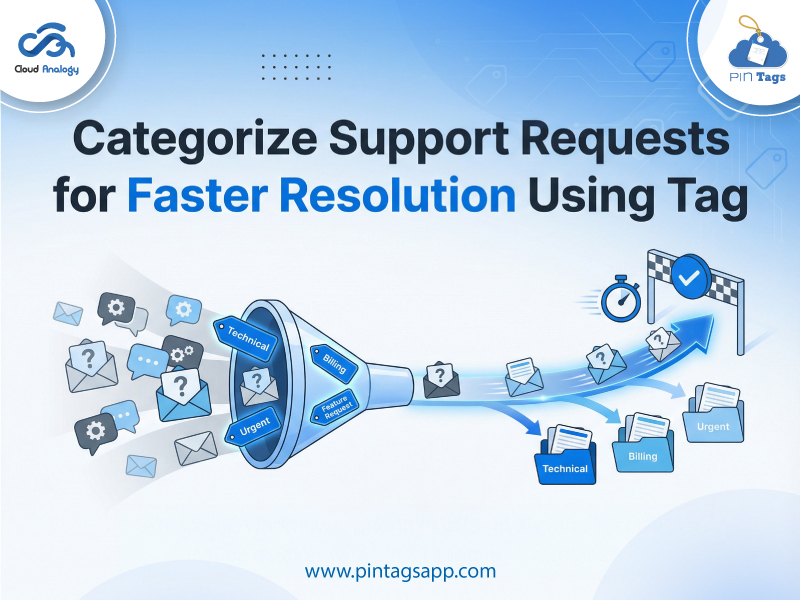
PinTags transforms this experience by enabling support teams to categorize support requests using tags and organize them into intuitive categories—ultimately accelerating response time and bringing complete clarity to support operations.
Challenges Faced by Support Teams
Support teams typically deal with hundreds of requests spanning diverse challenges—login issues, integration errors, account configuration needs, permission adjustments, and more. Without a structured tagging system, these requests become just another entry in the queue. Teams often encounter:
- Manual triage and routing delays
- Difficulty prioritizing recurring incidents
- Limited visibility into common problem clusters
- Difficulty generating accurate insights for decision making
The Solution: PinTags Category Creation
Pintags eliminates these obstacles through an intuitive Category Creation feature that enables users to group related tags into organized, meaningful clusters. This allows teams to view, filter, and manage tags in bulk—supercharging support operations with clarity and automation.
With Category Creation, you can:
- Organize tags into meaningful categories
- Easily filter and view tags related to a specific function
- Reduce noise and confusion for support agents
- Streamline reporting and analytics
- Boost overall support efficiency
Instead of endless scrolling, agents instantly see tags grouped by theme—such as billing, technical issues, onboarding, product feedback, or service outages.
How Category Creation Improves Support Efficiency
1. Faster Tag Discovery
When tags are bundled into categories, agents can access them in seconds rather than searching through large lists.
2. Cleaner User Experience
Structured tags reduce clutter, enhance visibility, and maintain consistency across teams.
3. Streamlined Reporting
Categories allow managers to identify trends and frequently occurring issue types with higher accuracy.
4. Reduced Ticket Backlogs
With quicker classification, response time dramatically improves—resulting in faster resolutions.
Step-By-Step To Create a Category in PinTags
Step 1: Click on the “Category Creation” Tab. Navigate to the dedicated tab from your PinTags panel.
Step 2: Enter the Category Name and Description. Name your category based on the type of issues—e.g., “Billing Errors,” “Login Issues,” or “Account Updates.” Add a short description to define its scope.
Step 3: Choose the Icon Group and Icon Name: Use the built-in information symbol to select a relevant icon. This makes categories visually recognizable for agents.
Step 4: Save and Review: Once saved, the newly created category will instantly appear under the Existing Categories section.
Use Case: High-Volume Support Teams
Challenges:
A high-volume SaaS support team struggles with routing hundreds of support tickets daily, often dealing with repetitive requests but lacking visibility into key pain points. Agents use tags, but with dozens of similar tags, triage becomes confusing.
Solution with Category Creation:
Tags related to login failures, SSO configuration, password resets, and access permissions are grouped under a “User Access Issues” category. Agents now filter all related tags instantly.
Result:
Average resolution time drops, recurring issue spikes are detected faster, and context is easily shared across teams.
Use Case: Product Feature Feedback
Challenges:
Product managers receive scattered feedback but can’t reliably connect related insights.
Solution:
Create a “Feature Enhancement Requests” category and assign tags like UI changes, workflow automation, integration suggestions, etc.
Result:
Product teams gain visibility into high-demand features with better prioritization data.
Use Case: Compliance & Audit Readiness
Challenges:
Organizations struggle with reporting on security incidents and governance tickets.
Solution:
Tags like policy updates, access audits, user risk alerts, and compliance failures are grouped under a “Governance & Compliance” category.
Result:
Audit cycles become faster and more transparent, reducing risk exposure.
The Impact on Support Operations
When categories are used consistently, organizations experience:
- Reduced handling time: Agents find related issues faster
- Better prioritization: Urgent categories stand out
- Improved knowledge transfer: New agents understand system flows quickly
- Accurate analytics: Reports show true issue distribution
These small efficiencies add up to massive productivity gains across the support lifecycle.
Conclusion
PinTags Category Creation is more than a tagging feature—it’s a productivity accelerator. With Pintags, teams embrace a smarter, more scalable approach to managing work queues and knowledge patterns.
By organizing tags into well-defined categories, support leaders instantly gain visibility into recurring issues, ticket trends, and operational bottlenecks. Teams perform with greater efficiency, speed, and confidence—without adding complexity. Start organizing your support tagging workflow effortlessly with Pintags Category Creation. Experience faster resolutions, cleaner reporting, and smarter support decisions today. Get PinTags on AppExchange to streamline support tagging and boost resolution speed. Experience organized categories, faster filtering, and smarter insights. Book a demo today and transform your support operations!